Flink join
Flink DataStream API为用户提供了3个算子来实现双流join,分别是:
- join(): inner join,on window
- coGroup(): custom join, on window
- intervalJoin(): inner join, on time range, keyed stream
另外,还提供了broadcast join来关联较小的
准备数据
从Kafka分别接入点击流和订单流,并转化为POJO。
1
2
3
4
5
6
7
8
9
10
11
12
13
14
15
16
17
| DataStream<String> clickSourceStream = env
.addSource(new FlinkKafkaConsumer011<>(
"ods_analytics_access_log",
new SimpleStringSchema(),
kafkaProps
).setStartFromLatest());
DataStream<String> orderSourceStream = env
.addSource(new FlinkKafkaConsumer011<>(
"ods_ms_order_done",
new SimpleStringSchema(),
kafkaProps
).setStartFromLatest());
DataStream<AnalyticsAccessLogRecord> clickRecordStream = clickSourceStream
.map(message -> JSON.parseObject(message, AnalyticsAccessLogRecord.class));
DataStream<OrderDoneLogRecord> orderRecordStream = orderSourceStream
.map(message -> JSON.parseObject(message, OrderDoneLogRecord.class));
|
join()
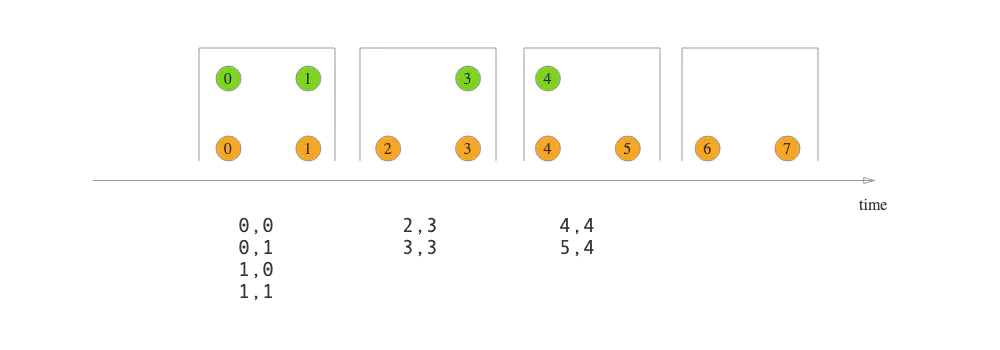
join()算子提供的语义为”Window join“,即按照指定字段和(滚动/滑动/会话)窗口进行inner join,支持处理时间和事件时间两种时间特征。
以下示例以10秒滚动窗口,将两个流通过商品ID关联,取得订单流中的售价相关字段。
1
2
3
4
5
6
7
8
9
10
11
12
13
14
15
16
17
| clickRecordStream
.join(orderRecordStream)
.where(record -> record.getMerchandiseId())
.equalTo(record -> record.getMerchandiseId())
.window(TumblingProcessingTimeWindows.of(Time.seconds(10)))
.apply(new JoinFunction<AnalyticsAccessLogRecord, OrderDoneLogRecord, String>() {
@Override
public String join(AnalyticsAccessLogRecord accessRecord, OrderDoneLogRecord orderRecord) throws Exception {
return StringUtils.join(Arrays.asList(
accessRecord.getMerchandiseId(),
orderRecord.getPrice(),
orderRecord.getCouponMoney(),
orderRecord.getRebateAmount()
), '\t');
}
})
.print().setParallelism(1);
|
简单易用。
coGroup()
只有inner join肯定还不够,如何实现left/right outer join呢?答案就是利用coGroup()算子。它的调用方式类似于join()算子,也需要开窗,但是CoGroupFunction比JoinFunction更加灵活,可以按照用户指定的逻辑匹配左流和/或右流的数据并输出。
以下的例子就实现了点击流left join订单流的功能,是很朴素的nested loop join思想(二重循环)。
1
2
3
4
5
6
7
8
9
10
11
12
13
14
15
16
17
18
19
20
21
22
23
| clickRecordStream
.coGroup(orderRecordStream)
.where(record -> record.getMerchandiseId())
.equalTo(record -> record.getMerchandiseId())
.window(TumblingProcessingTimeWindows.of(Time.seconds(10)))
.apply(new CoGroupFunction<AnalyticsAccessLogRecord, OrderDoneLogRecord, Tuple2<String, Long>>() {
@Override
public void coGroup(Iterable<AnalyticsAccessLogRecord> accessRecords, Iterable<OrderDoneLogRecord> orderRecords, Collector<Tuple2<String, Long>> collector) throws Exception {
for (AnalyticsAccessLogRecord accessRecord : accessRecords) {
boolean isMatched = false;
for (OrderDoneLogRecord orderRecord : orderRecords) {
collector.collect(new Tuple2<>(accessRecord.getMerchandiseName(), orderRecord.getPrice()));
isMatched = true;
}
if (!isMatched) {
collector.collect(new Tuple2<>(accessRecord.getMerchandiseName(), null));
}
}
}
})
.print().setParallelism(1);
|
CoGroupFunction中会返回所有数据,不管有没有匹配上
1
2
3
4
5
6
7
8
9
10
11
12
13
14
15
16
17
18
19
20
21
22
23
24
25
26
27
28
29
30
31
32
33
34
35
36
37
38
39
40
41
42
43
44
45
46
47
48
| DataStream<Tuple3<Long, String, String>> input1 = ...;
input1 = input1.assignTimestampsAndWatermarks(new AscendingTimestampExtractor<Tuple3<Long, String, String>>() {
@Override
public long extractAscendingTimestamp(Tuple3<Long, String, String> arg0) {
return arg0.f0;
}
});
DataStream<Tuple2<Long, String>> input2 = ...;
input2 = input2.assignTimestampsAndWatermarks(new AscendingTimestampExtractor<Tuple2<Long, String>>() {
@Override
public long extractAscendingTimestamp(Tuple2<Long, String> stringStringTuple2) {
return stringStringTuple2.f0;
}
});
input1.coGroup(input2).where(new KeySelector<Tuple3<Long, String, String>, String>() {
@Override
public String getKey(Tuple3<Long, String, String> itemEntity) throws Exception {
return itemEntity.f1;
}
})
.equalTo(new KeySelector<Tuple2<Long, String>, String>() {
@Override
public String getKey(Tuple2<Long, String> value) throws Exception {
return value.f1;
}
})
.window(TumblingEventTimeWindows.of(Time.minutes(1)))
.apply(new CoGroupFunction<Tuple3<Long, String, String>, Tuple2<Long, String>, String>() {
@Override
public void coGroup(Iterable<Tuple3<Long, String, String>> first,
Iterable<Tuple2<Long, String>> second, Collector<String> collector) throws Exception {
StringBuilder buffer = new StringBuilder();
buffer.append("DataStream first:\n");
for (Tuple3<Long, String, String> value : first) {
buffer.append(value).append("\n");
}
buffer.append("DataStream second:\n");
for (Tuple2<Long, String> value : second) {
buffer.append(value.f0).append("=>").append(value.f1).append("\n");
}
collector.collect(buffer.toString());
}
})
.print();
|
上面的例子,左流有三个元素 Tuple3<String,String,String>,右流有两个元素Tuple2<String,String>
两个流第一个元素相互关联。分别指定两个流的事件时间字段。
两个流关联后,按照EventTime划分窗口。与单流类似。
不管元素是否可以关联上,都会输出
用户可以定义CoGroupFunction函数, 可以实现在窗口内,任意组合,如笛卡尔积
intervalJoin()
join()和coGroup()都是基于窗口做关联的。但是在某些情况下,两条流的数据步调未必一致。例如,订单流的数据有可能在点击流的购买动作发生之后很久才被写入,如果用窗口来圈定,很容易join不上。所以Flink又提供了”Interval join“的语义,按照指定字段以及右流相对左流偏移的时间区间进行关联,即:
$right.timestamp ∈ [left.timestamp + lowerBound; left.timestamp + upperBound]$
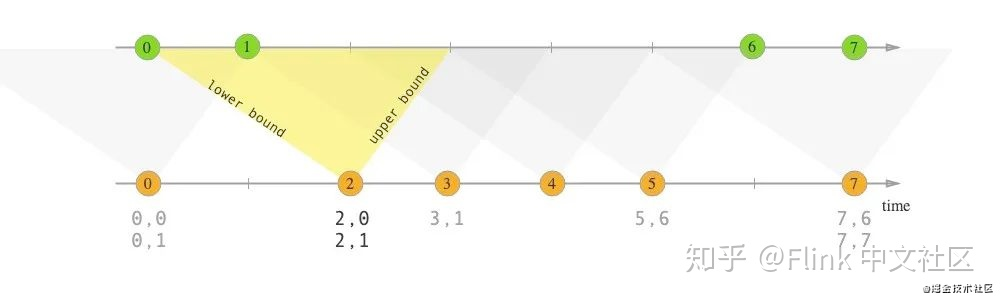
interval join也是inner join,虽然不需要开窗,但是需要用户指定偏移区间的上下界,并且只支持事件时间。
示例代码如下。注意在运行之前,需要分别在两个流上应用assignTimestampsAndWatermarks()方法获取事件时间戳和水印。
1
2
3
4
5
6
7
8
9
10
11
12
13
14
15
16
| clickRecordStream
.keyBy(record -> record.getMerchandiseId())
.intervalJoin(orderRecordStream.keyBy(record -> record.getMerchandiseId()))
.between(Time.seconds(-30), Time.seconds(30))
.process(new ProcessJoinFunction<AnalyticsAccessLogRecord, OrderDoneLogRecord, String>() {
@Override
public void processElement(AnalyticsAccessLogRecord accessRecord, OrderDoneLogRecord orderRecord, Context context, Collector<String> collector) throws Exception {
collector.collect(StringUtils.join(Arrays.asList(
accessRecord.getMerchandiseId(),
orderRecord.getPrice(),
orderRecord.getCouponMoney(),
orderRecord.getRebateAmount()
), '\t'));
}
})
.print().setParallelism(1);
|
由上可见,interval join与window join不同,是两个KeyedStream之上的操作,并且需要调用between()方法指定偏移区间的上下界。如果想令上下界是开区间,可以调用upperBoundExclusive()/lowerBoundExclusive()方法。
interval join的实现原理
以下是KeyedStream.process(ProcessJoinFunction)方法调用的重载方法的逻辑。
1
2
3
4
5
6
7
8
9
10
11
12
13
14
15
16
17
18
19
20
21
| public <OUT> SingleOutputStreamOperator<OUT> process(
ProcessJoinFunction<IN1, IN2, OUT> processJoinFunction,
TypeInformation<OUT> outputType) {
Preconditions.checkNotNull(processJoinFunction);
Preconditions.checkNotNull(outputType);
final ProcessJoinFunction<IN1, IN2, OUT> cleanedUdf = left.getExecutionEnvironment().clean(processJoinFunction);
final IntervalJoinOperator<KEY, IN1, IN2, OUT> operator =
new IntervalJoinOperator<>(
lowerBound,
upperBound,
lowerBoundInclusive,
upperBoundInclusive,
left.getType().createSerializer(left.getExecutionConfig()),
right.getType().createSerializer(right.getExecutionConfig()),
cleanedUdf
);
return left
.connect(right)
.keyBy(keySelector1, keySelector2)
.transform("Interval Join", outputType, operator);
}
|
可见是先对两条流执行connect()和keyBy()操作,然后利用IntervalJoinOperator算子进行转换。在IntervalJoinOperator中,会利用两个MapState分别缓存左流和右流的数据。
1
2
3
4
5
6
7
8
9
10
11
12
13
14
15
16
17
| private transient MapState<Long, List<BufferEntry<T1>>> leftBuffer;
private transient MapState<Long, List<BufferEntry<T2>>> rightBuffer;
@Override
public void initializeState(StateInitializationContext context) throws Exception {
super.initializeState(context);
this.leftBuffer = context.getKeyedStateStore().getMapState(new MapStateDescriptor<>(
LEFT_BUFFER,
LongSerializer.INSTANCE,
new ListSerializer<>(new BufferEntrySerializer<>(leftTypeSerializer))
));
this.rightBuffer = context.getKeyedStateStore().getMapState(new MapStateDescriptor<>(
RIGHT_BUFFER,
LongSerializer.INSTANCE,
new ListSerializer<>(new BufferEntrySerializer<>(rightTypeSerializer))
));
}
|
其中Long表示事件时间戳,List<BufferEntry<T>>表示该时刻到来的数据记录。
当左流和右流有数据到达时,会分别调用processElement1()和processElement2()方法,它们都调用了processElement()方法,代码如下。
1
2
3
4
5
6
7
8
9
10
11
12
13
14
15
16
17
18
19
20
21
22
23
24
25
26
27
28
29
30
31
32
33
34
35
36
37
38
39
40
41
42
43
44
45
46
47
48
49
| @Override
public void processElement1(StreamRecord<T1> record) throws Exception {
processElement(record, leftBuffer, rightBuffer, lowerBound, upperBound, true);
}
@Override
public void processElement2(StreamRecord<T2> record) throws Exception {
processElement(record, rightBuffer, leftBuffer, -upperBound, -lowerBound, false);
}
@SuppressWarnings("unchecked")
private <THIS, OTHER> void processElement(
final StreamRecord<THIS> record,
final MapState<Long, List<IntervalJoinOperator.BufferEntry<THIS>>> ourBuffer,
final MapState<Long, List<IntervalJoinOperator.BufferEntry<OTHER>>> otherBuffer,
final long relativeLowerBound,
final long relativeUpperBound,
final boolean isLeft) throws Exception {
final THIS ourValue = record.getValue();
final long ourTimestamp = record.getTimestamp();
if (ourTimestamp == Long.MIN_VALUE) {
throw new FlinkException("Long.MIN_VALUE timestamp: Elements used in " +
"interval stream joins need to have timestamps meaningful timestamps.");
}
if (isLate(ourTimestamp)) {
return;
}
addToBuffer(ourBuffer, ourValue, ourTimestamp);
for (Map.Entry<Long, List<BufferEntry<OTHER>>> bucket: otherBuffer.entries()) {
final long timestamp = bucket.getKey();
if (timestamp < ourTimestamp + relativeLowerBound ||
timestamp > ourTimestamp + relativeUpperBound) {
continue;
}
for (BufferEntry<OTHER> entry: bucket.getValue()) {
if (isLeft) {
collect((T1) ourValue, (T2) entry.element, ourTimestamp, timestamp);
} else {
collect((T1) entry.element, (T2) ourValue, timestamp, ourTimestamp);
}
}
}
long cleanupTime = (relativeUpperBound > 0L) ? ourTimestamp + relativeUpperBound : ourTimestamp;
if (isLeft) {
internalTimerService.registerEventTimeTimer(CLEANUP_NAMESPACE_LEFT, cleanupTime);
} else {
internalTimerService.registerEventTimeTimer(CLEANUP_NAMESPACE_RIGHT, cleanupTime);
}
}
|
这段代码的思路是:
- 取得当前流
StreamRecord的时间戳,调用isLate()方法判断它是否是迟到数据(即时间戳小于当前水印值),如是则丢弃。
- 调用
addToBuffer()方法,将时间戳和数据一起插入当前流对应的MapState。
- 遍历另外一个流的
MapState,如果数据满足前述的时间区间条件,则调用collect()方法将该条数据投递给用户定义的ProcessJoinFunction进行处理。
collect()方法的代码如下,注意结果对应的时间戳是左右流时间戳里较大的那个。
1
2
3
4
5
6
| private void collect(T1 left, T2 right, long leftTimestamp, long rightTimestamp) throws Exception {
final long resultTimestamp = Math.max(leftTimestamp, rightTimestamp);
collector.setAbsoluteTimestamp(resultTimestamp);
context.updateTimestamps(leftTimestamp, rightTimestamp, resultTimestamp);
userFunction.processElement(left, right, context, collector);
}
|
- 调用
TimerService.registerEventTimeTimer()注册时间戳为timestamp + relativeUpperBound的定时器,该定时器负责在水印超过区间的上界时执行状态的清理逻辑,防止数据堆积。注意左右流的定时器所属的namespace是不同的,具体逻辑则位于onEventTime()方法中。
1
2
3
4
5
6
7
8
9
10
11
12
13
14
15
16
17
18
19
20
21
22
| @Override
public void onEventTime(InternalTimer<K, String> timer) throws Exception {
long timerTimestamp = timer.getTimestamp();
String namespace = timer.getNamespace();
logger.trace("onEventTime @ {}", timerTimestamp);
switch (namespace) {
case CLEANUP_NAMESPACE_LEFT: {
long timestamp = (upperBound <= 0L) ? timerTimestamp : timerTimestamp - upperBound;
logger.trace("Removing from left buffer @ {}", timestamp);
leftBuffer.remove(timestamp);
break;
}
case CLEANUP_NAMESPACE_RIGHT: {
long timestamp = (lowerBound <= 0L) ? timerTimestamp + lowerBound : timerTimestamp;
logger.trace("Removing from right buffer @ {}", timestamp);
rightBuffer.remove(timestamp);
break;
}
default:
throw new RuntimeException("Invalid namespace " + namespace);
}
}
|
broadcast join
interval join