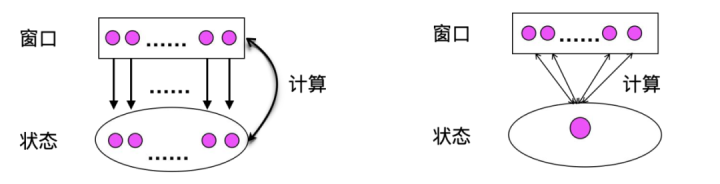
窗口会自动管理状态和触发计算,Flink 提供了丰富的窗口函数来进行计算。主要包括以下两种:
ProcessWindowFunction,全量计算会把所有数据缓存到状态里,一直到窗口结束时统一计算。相对来说,状态会比较大,计算效率也会低一些;
AggregateFunction,增量计算就是来一条数据就算一条,可能我们的状态就会特别的小,计算效率也会比 ProcessWindowFunction 高很多,但是如果状态存储在磁盘频繁访问状态可能会影响性能。
0.1 窗口的触发 1 2 3 4 5 6 7 8 9 10 11 12 13 14 15 16 17 18 19 20 21 22 23 24 25 26 27 28 29 30 31 32 33 34 35 36 37 38 39 40 41 42 43 44 45 46 47 48 49 50 51 52 StreamExecutionEnvironment env = StreamExecutionEnvironment.getExecutionEnvironment();env.setStreamTimeCharacteristic(TimeCharacteristic.EventTime); SingleOutputStreamOperator <ItemEntity> streamOperator = env .socketTextStream("127.0.0.1" , 9091 ) .map(new MapFunction <String, ItemEntity>() { @Override public ItemEntity map (String s) throws Exception { String [] split = null ; if (s.isEmpty() || (split = s.split("," )).length != 2 ) { return null ; } ItemEntity itemEntity = ItemEntity.builder().timestamp(split[0 ]) .eventId(split[1 ]) .build(); return itemEntity; } }) .filter(Objects::nonNull) .assignTimestampsAndWatermarks(new AscendingTimestampExtractor <ItemEntity>() { @Override public long extractAscendingTimestamp (ItemEntity itemEntity) { long timestamp = itemEntity.getTimestamp(); return timestamp; } }); streamOperator .keyBy(new KeySelector <ItemEntity, String>() { @Override public String getKey (ItemEntity itemEntity) throws Exception { String eventId = itemEntity.getEventId(); return eventId; } }) .window(TumblingEventTimeWindows.of(Time.seconds(5 ))) .process( new ProcessWindowFunction <ItemEntity, Tuple2<String, String>, String, TimeWindow>() { @Override public void process (String s, Context context, Iterable<ItemEntity> iterable, Collector<Tuple2<String, String>> collector) throws Exception { for (ItemEntity itemEntity : iterable) { long timestamp = itemEntity.getTimestamp(); Date date = new Date (timestamp); SimpleDateFormat simpleDateFormat = new SimpleDateFormat ( "yyyy-MM-dd HH:mm:ss" ); collector.collect(Tuple2.of(itemEntity.getEventId(), timestamp + "->" + simpleDateFormat.format(date))); } } }) .print(); env.execute("test-window" );
5秒的窗口
1
2
3
4
5
6
7
8
9
10
11
12
13
2020-04-01 00:01:00,1 2020-04-01 00:01:00,1 2020-04-01 00:01:06,1 # 触发计算 (1,1585670460000->2020-04-01 00:01:00) (1,1585670460000->2020-04-01 00:01:00) 2020-04-01 00:01:00,1 # 窗口已经关闭,旧数据 # WARN org.apache.flink.streaming.api.functions.timestamps.AscendingTimestampExtractor [] - Timestamp monotony violated: 1585670460000 < 1585670466000 2020-04-01 00:01:06,1 2020-04-01 00:01:07,1 2020-04-01 00:01:11,1 # 触发计算 (1,1585670466000->2020-04-01 00:01:06) (1,1585670466000->2020-04-01 00:01:06) (1,1585670467000->2020-04-01 00:01:07)
0.2 window的抽象概念 1 2 3 4 5 6 7 8 9 10 11 12 13 14 15 16 17 18 19 20 21 Keyed Windows stream .keyBy(...) <- keyed versus non-keyed windows .window(...) <- required: "assigner" [.trigger(...)] <- optional: "trigger" (else default trigger) [.evictor(...)] <- optional: "evictor" (else no evictor) [.allowedLateness(...)] <- optional: "lateness" (else zero) [.sideOutputLateData(...)] <- optional: "output tag" (else no side output for late data) .reduce/aggregate/fold/apply() <- required: "function" [.getSideOutput(...)] <- optional: "output tag" Non-Keyed Windows stream .windowAll(...) <- required: "assigner" [.trigger(...)] <- optional: "trigger" (else default trigger) [.evictor(...)] <- optional: "evictor" (else no evictor) [.allowedLateness(...)] <- optional: "lateness" (else zero) [.sideOutputLateData(...)] <- optional: "output tag" (else no side output for late data) .reduce/aggregate/fold/apply() <- required: "function" [.getSideOutput(...)] <- optional: "output tag"
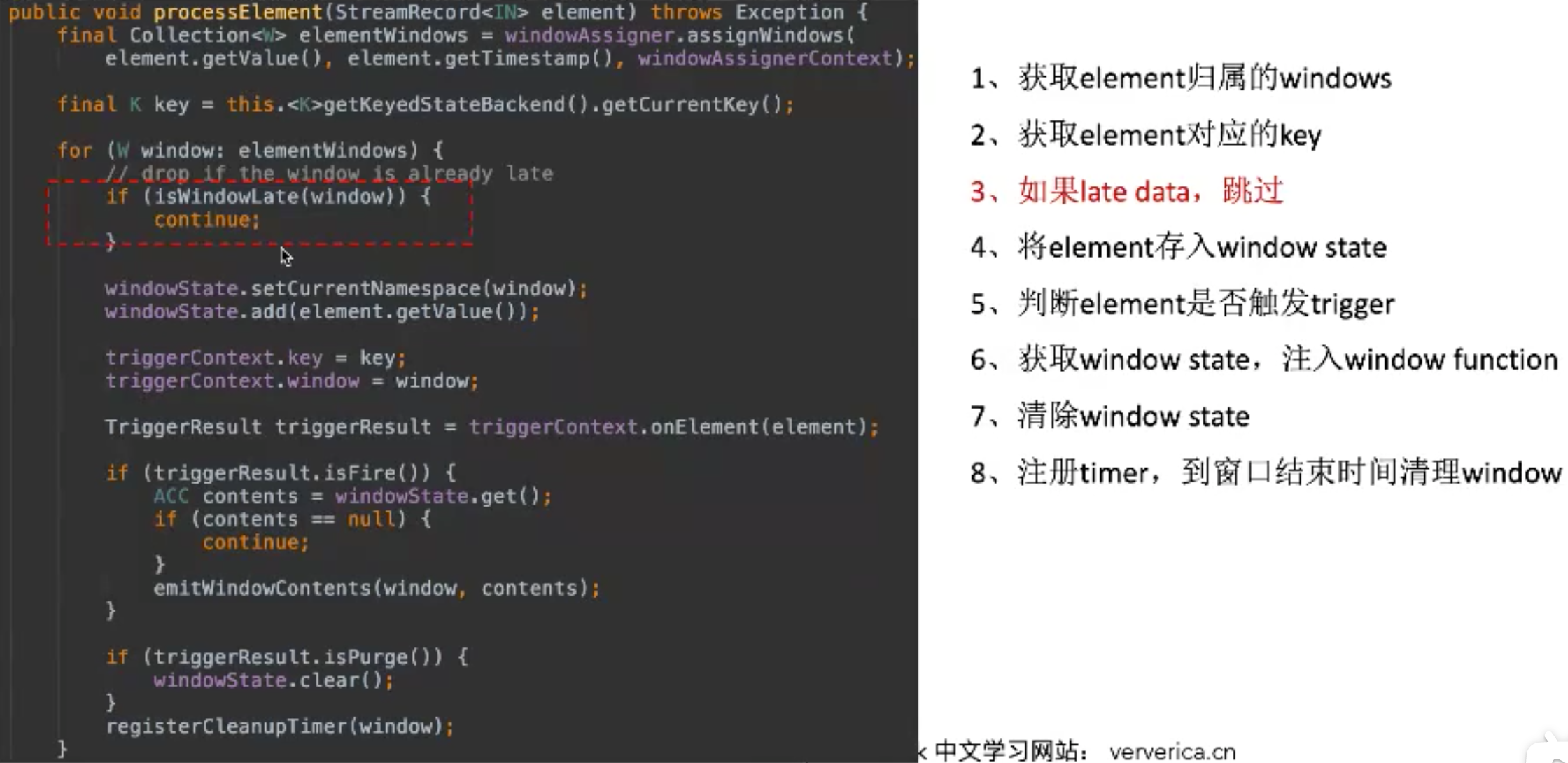
0.2.1 window assigner 0.2.2 window trigger 0.2.3 window evictor 0.3 windowOperator工作流程
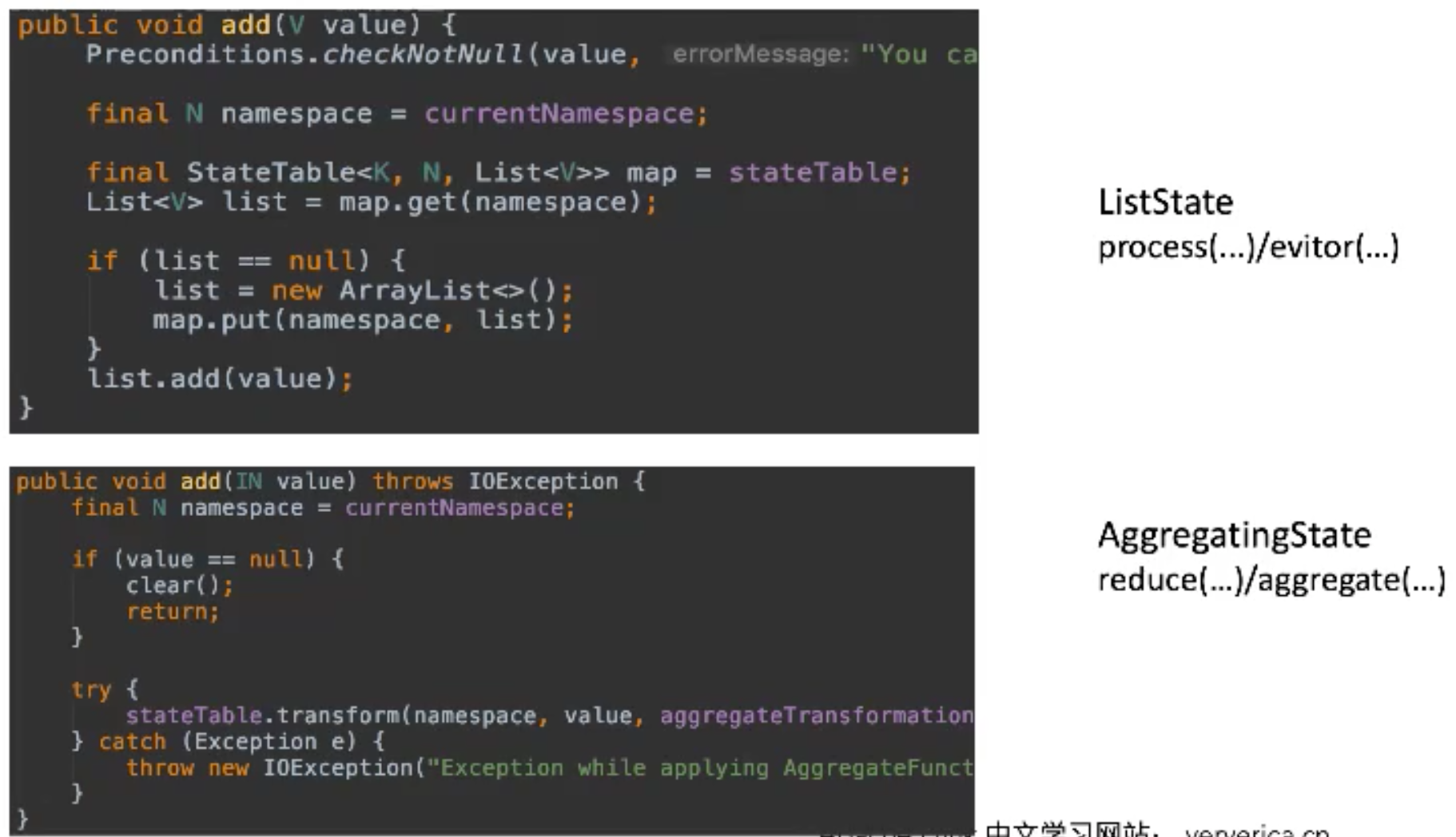
0.3.1 window state
0.4 Session window Flink 原理与实现:Session Window
SESSION(time_attr, interval)定义一个会话时间窗口。interval 所定义的不活跃时间所确定;即一个会话时间窗口在定义的间隔时间内没有时间出现,该窗口会被关闭。例如时间窗口的间隔时间是 30 分钟,当其不活跃的时间达到30分钟后,若观测到新的记录,则会启动一个新的会话时间窗口(否则该行数据会被添加到当前的窗口),且若在 30 分钟内没有观测到新纪录,这个窗口将会被关闭。会话时间窗口可以使用事件时间(批处理、流处理)或处理时间(流处理)。
流式数据处理中,很多操作要依赖于时间属性进行,因此时间属性也是流式引擎能够保证准确处理数据的基石。在这篇文章中,我们将对 Flink 中时间属性和窗口的实现逻辑进行分析。
0.5 all window operator’s parallelism is 1 If the parallelism of the environment is set to 3 and you are using a WindowAll operator, only the window operator runs in parallelism 1. The sink will still be running with parallelism 3. Hence, the plan looks as follows:
1
2
3
In_1 -\ /- Out_1 In_2 --- WindowAll_1 --- Out_2 In_3 -/ \- Out_3
The WindowAll operator emits its output to its subsequent tasks using a round-robin strategy. That’s the reason for the different threads emitting the result records of program.
When you set the environment parallelism to 1, all operators run with a single task.
keyed-windown —分布式计算—> all-windown
【参考文献】
flink原理与实现: window机制 flink窗口应用与实现 Flink原理: 窗口原理详解 Flink滑动窗口原理与细粒度滑动窗口的性能问题